How to Set Up a SIM Card Record and Add it to a Gallery
Steps to create an optional SIM card record for tracking purposes and assign it to an installation via Gallery Settings
SIM card details can be recorded in the Control Hub to help with record keeping and identifying what SIM cards are being used in which units. This is an optional feature and has no bearing on the performance of units.
The steps for adding a new SIM card record, and assigning it to an installation are as follows:
-
Select the Management - SIM Cards tab from the Control Hub
-
Click the + Create SIM Card link in the top-right of the pane to add a new SIM card record
-
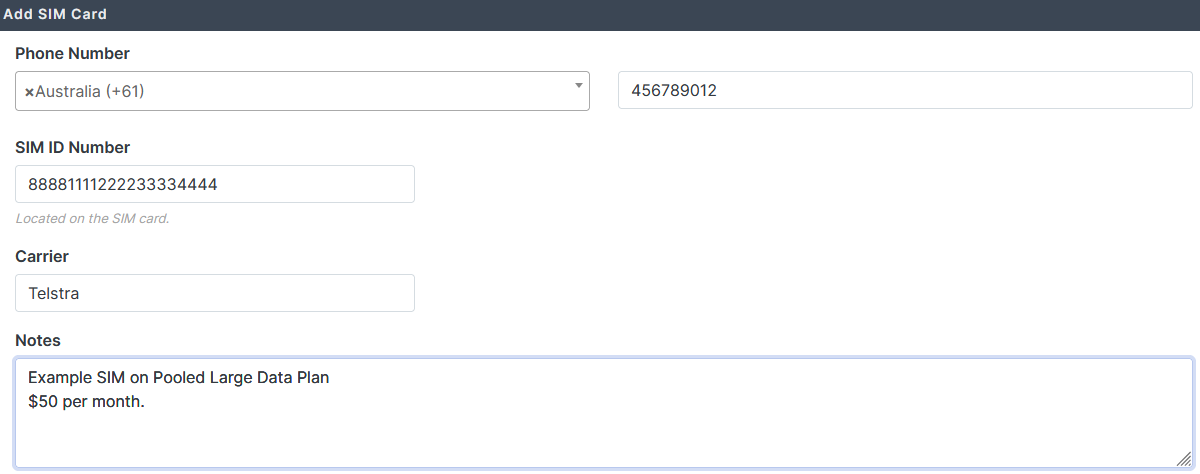
Fill in the fields as required. E.g.
-
Select Save
-
Select the gallery that you want to assign the SIM card to from the search field
-
Select the Gallery Settings tab
-
Select the desired SIM from the Assigned SIM card drop-down menu
-
Click the Save Details button