Configure Alert for AC Power Disconnected
By default, your feed will generate an alert when the battery voltage level drops below the threshold of 7600 mV (7.6 volts).
Configure Alert for AC Power Disconnected
By default, your feed will generate an alert when the battery voltage level drops below the threshold of 7600 mV (7.6 volts).
If your feed is powered by AC, you can change this threshold so an alert is generated sooner, if the power is unplugged.
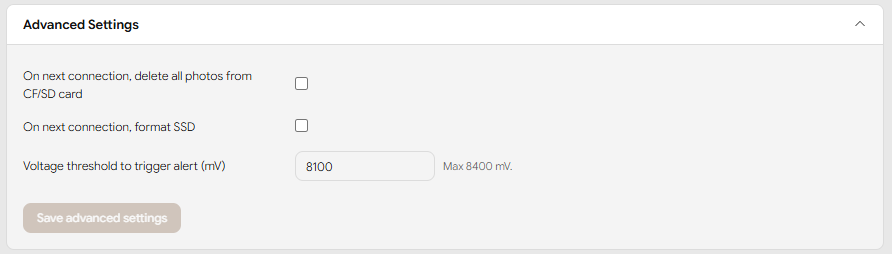
To detect when AC power is disconnected on a photoSentinel Tempo and Mach II, set this threshold to 8100 mV (8.1 volts).
Configure your voltage threshold by doing the following steps:
- Select the feed that you want to set AC power disconnection warnings for.
- Go to the feed's Schedule tab.
- Scroll down to Advanced Settings.
- Set the value for Voltage threshold to trigger alert (mV) to:
- 8100 for Tempo and Mach II Note: Do not type “mV” next to the value.
- Click Save advanced settings to apply your changes.
Your feed will now generate alerts when the battery voltage drops soon after the AC power is disconnected.
To learn how to change other Alerts and Notification preferences, or to learn more about the Alerts System, read our Knowledge Base article on Alerts.